
6 answers
Setup and pairing
The 6-character code, which guide to follow, and the Fire TV 4-digit code.
- How do I pair Tadu Remote with my parent's TV?
- Which guide do I follow?
- The TV asks for a 4-digit code (Fire TV). What is it?
Help your parents’ TV from anywhere. Free for 14 days.See plans →
Help Center
Straight answers first, detail second. Setting up the TV? Fire TV guide · Google TV guide · printable card for your parent.
 Back to their show
Browse by topic
The 6-character code, which guide to follow, and the Fire TV 4-digit code.
Wrong or expired codes, removing a TV, adding family, and moving a TV between accounts.
Consent, recording, black screens, and why a session ends.
What a message is, how long it is kept, and how reminders behave.
Who can help, what each helper may do, and who pays.
The trial, cancelling, refunds, Live Cast minutes, and what stays free.
What is collected, your rights, and deleting your account.
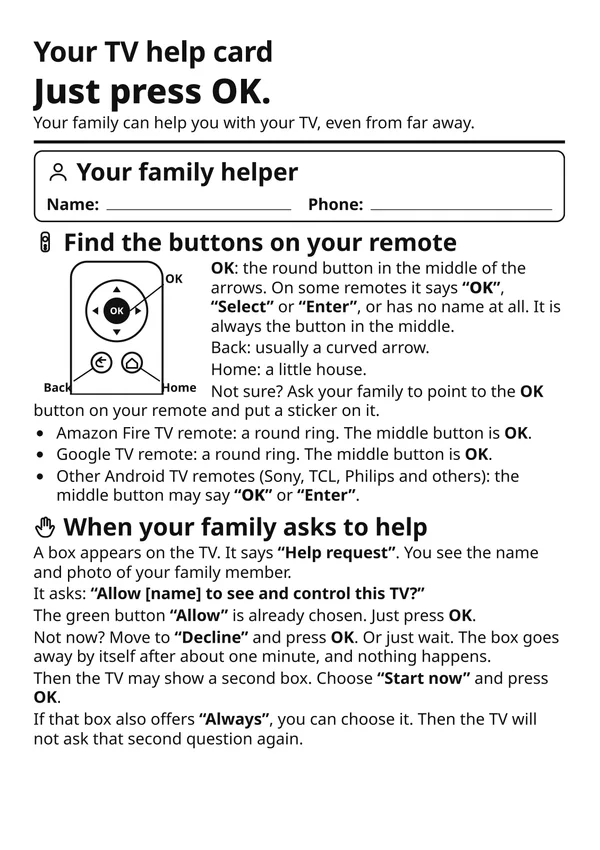
 All guides →The TV help cardOne printable page for your parent, in 11 languages: which button to press on each Tadu screen.
 Get the card →
Get the TV app
Most setup questions are answered by the right guide. The TV app is free on Google Play for Google TV and Android TV, and on the Amazon Appstore for Fire TV.
Google TV · Android TV
Open the listing, choose Install and pick their TV, or search “Tadu Remote” in Google Play on the TV itself.
Fire TV
On the Fire TV, search the Amazon Appstore for “Tadu Remote” and install it. The TV app is free.
For the parent
One page to keep by the TV that explains Tadu to your parent, in 11 languages.
01 / 6 answers
The 6-character code, which guide to follow, and the Fire TV 4-digit code.
Install the free Tadu Remote app on their TV: the Amazon Appstore on a Fire TV, Google Play on a Google TV or Android TV. The TV first asks you to install the phone app, then shows a 6-character code that refreshes every 5 minutes. In your phone app, tap Pair a new TV and type the code; capitals don't matter. Pairing is done once; every screen-sharing session afterwards still asks for their Allow on the TV.
If the TV or stick runs Fire OS (Amazon), follow the Fire TV guide. If it runs Google TV or Android TV, follow the Google TV guide. The two differ only in how the remote and the screen permissions are set up; pairing and everything on your phone are the same.
Fire TV links the remote through Amazon's own pairing. Your phone shows "Show me the code", the TV displays a 4-digit code, and you type it in the Tadu phone app, never on the TV. You only do this once. If the TV says the code didn't work, a fresh code is already on the TV; type the new one.
Android TV, Google TV and Amazon Fire TV. Tadu installs like any other TV app, with no extra hardware and no camera. The phone app runs on iPhone, iPad and Android phones. Tadu is not available on Apple TV, Roku, Samsung or LG TVs today.
No. Everything your parent needs lives on the TV: the consent card, messages, reminders and the Call for help button. Their only job is pressing OK on their own remote when your name appears, or one press of Call for help when they need you.
Yes, that is the point of Tadu. Assist works over any ordinary internet connection: home Wi-Fi, 4G, 5G, another city, another country; there is no same-Wi-Fi requirement. When you are on their home Wi-Fi, your phone is also a free remote for the TV, with no plan needed.
02 / 5 answers
Wrong or expired codes, removing a TV, adding family, and moving a TV between accounts.
Codes last 5 minutes and the TV shows a new one by itself; press OK on the TV remote to get a new code straight away. Check the 6 characters on the TV and enter them again. If the app says the code was already used and you just paired this TV, go back to Home: it is already in your list.
Help, messages and reminders on that TV stop until it is paired again. When you remove it you choose whether its reminders wait for it or are deleted. If you pair the same TV again from the same account, its name and helpers come back. Removing a TV does not cancel your plan; manage that in your App Store or Google Play settings.
Yes, but add them as a helper instead of pairing the TV again from their own account. The TV's owner opens the TV in the app, then Share access, and invites them by email. Helpers do not need a plan of their own. Tadu Plus allows the owner plus 2 helpers on 1 TV; Tadu Family allows the owner plus 5 helpers per TV, up to 3 TVs.
Yes, if you are at the TV: enter the code it shows, and the app asks before moving it. Moving it removes access for the other account and its helpers. Their plan stays with them, and their reminders and messages for that TV are removed; nothing personal moves to you. They are told the TV was moved. The TV keeps working without being restarted. A TV gets one free trial in total, so a TV that already had one needs a plan.
Phone: sign in again and your TVs come back. TV: it shows a new code; pair it again from the same account and the same TV returns, with no duplicate. On Fire TV, Amazon may ask for its 4-digit remote step once more.
03 / 7 answers
Consent, recording, black screens, and why a session ends.
No. Never. A live session is encrypted, and nothing from it is recorded or stored. Video starts only after your phone confirms the session is encrypted; if it cannot, there is no video. Zero retention is how the system is built, not a policy promise.
No. Every screen-sharing session requires their Allow on the TV itself, on a card that shows your name and photo, within 60 seconds. No answer means no session. Only the TV can approve; a helper cannot approve their own request. Either side can end a running session at any moment, and the TV shows "Connected" while one runs.
Apps with copy protection, which includes most streaming services, do not let any device capture their video, so they show black in the live view. Your controls still work: you can navigate, press Back, open another app or fix a sign-in, and the picture returns as soon as the TV leaves the protected app.
Two limits exist. Every session stops after 2 hours. An Assist session also ends after 4 minutes with no activity on your phone, so a forgotten session never stays open. Just connect again; your parent presses Allow as before.
Yes, at any time. They can press Refuse on the request, ignore it (it closes by itself after 60 seconds), or end a running session from the TV. From the TV's Tadu Settings they can also unpair the TV entirely. The account owner can remove a helper from the phone app; that takes effect within about a second, even in the middle of a session.
First check the TV's internet connection; most "offline" cases are the TV's Wi-Fi. If the TV is online, open the Tadu app on the TV once to let it reconnect. If the problem persists, unpair and re-pair the TV from your phone app.
Session quality follows the slower of the two internet connections, most often the TV's Wi-Fi. Moving the router closer to the TV or reducing other traffic on it usually helps. Distance between you and the TV changes very little.
04 / 5 answers
What a message is, how long it is kept, and how reminders behave.
Yes. From your phone, set a reminder (a note, a photo, or a photo with a note) and it appears on their TV at the time you choose, in the TV's own time zone, once, daily, weekly or monthly. "Must confirm" reminders stay on screen until they press OK, Back means "remind me in 5 minutes", and you are told when they pressed OK. Your parent can pause or remove a reminder on the TV and you are told. Reminders support a routine; they are not a medical device.
A reminder never wakes a TV that is off. If the TV was off or offline at the set time, the reminder is skipped and your phone shows "Reminder missed", so you know to call. For daily medicines, a reminder set in their evening lands while the TV is usually on.
Yes. That is the one deliberate exception to the never-stored rule, and it exists so the TV can show the photo at the time you set. Reminder photos are stored encrypted, used for nothing else, and deleted when you delete the reminder or your account. Live sessions remain never recorded and never stored.
A message is a short text note, up to 80 characters (160 for an urgent one). It appears as a banner on the TV and in the TV's Messages inbox; your phone shows Sending, Delivered and Seen on TV. If the TV is off, it waits and arrives when the TV is back. Messages are kept up to 7 days, then deleted.
An urgent message wakes the screen, chimes, and stays on the TV until your parent presses OK, so it cannot be missed behind a programme. A normal message appears as a quiet banner and waits in the Messages inbox. On Fire TV, normal messages arrive as Fire TV notifications.
05 / 3 answers
Who can help, what each helper may do, and who pays.
Tadu Plus covers you, the owner, plus 2 helpers on 1 TV. Tadu Family covers you plus 5 helpers per TV, up to 3 TVs.
What you decide. For each helper and each TV, the account owner chooses which of Assist, Live Cast, Messages and Reminders they may use, and Tadu enforces it. You invite a helper by email; the link is valid for 7 days. The TV shows who can connect, and removing a helper takes effect within about a second, even mid-session.
No. Helpers use the account owner's plan and never need their own. Everyone, owner and helpers, also gets the free home-Wi-Fi remote, with or without a plan.
06 / 5 answers
The trial, cancelling, refunds, Live Cast minutes, and what stays free.
Yes. Try it free for 14 days, with trial limits of 60 minutes of Assist over the internet and 60 minutes of Live Cast. You start it inside the app after you pair the TV. The App Store or Google Play asks for a payment method, as it does for any trial; cancel before the end date and you are not charged, otherwise the plan you chose starts. Each TV gets one free trial.
Billing is handled entirely by the App Store or Google Play, so you cancel in the store's subscription settings; access continues until the end of the period you paid for. Refunds are requested through the store under its own policy, and a refund ends access immediately. Deleting your Tadu account does not cancel the subscription; cancel it in the store as well.
The home-Wi-Fi remote, Call for help, pairing and the reminders already on the TV keep working with no plan. Assist over the internet, messages, Live Cast and creating new reminders need a plan.
Live Cast and Photos over the internet use plan minutes: Tadu Plus includes 90 minutes a month, Tadu Family 180, and the free trial a single pool of 60. Casting on their home Wi-Fi is free and not counted. If you run out, the app offers top-up packs at your store's local price; each pack is valid for one month from purchase and is non-refundable.
Yes. Tadu works across countries and networks; helper abroad, TV at home is the everyday case. Prices vary by country, and the App Store or Google Play shows the exact charge in your account's currency before you subscribe.
07 / 4 answers
What is collected, your rights, and deleting your account.
Only what is needed to run the service: account details (name, email, an optional phone number; email and phone are stored encrypted), device details (TV model, system version) and session records (who connected to which TV, and when). Never what was on the screen: no session video or audio. The one media we hold is a photo you attach to a reminder, encrypted until you delete it. Usage analytics are pseudonymous and processed in the EU.
Tadu Remote is built to honour the rights India's Digital Personal Data Protection Act, 2023, the GDPR and the CCPA/CPRA give you: our primary data storage is in India, pseudonymous analytics are processed in the EU, we never sell personal data, and you can export or delete your data from the app at any time. A named Grievance Officer is reachable at support@taduremote.com.
In the app, open Settings, then Privacy, then Delete my account. Your account is deleted after a 30-day grace period; sign back in within those 30 days to cancel the deletion. Deleting the account does not cancel a store subscription, so cancel that in the App Store or Google Play too. You can also email us from the address on your account.
Email support@taduremote.com. We read every message.
Still stuck?
Email support@taduremote.com. It helps to say which TV it is (Fire TV, Google TV or Android TV) and what the screen shows.
Support
For anything about your account, pairing or billing. We read every message.
Privacy
Privacy complaints under the DPDP Act, acknowledged within 48 hours.
Related: how privacy is built in, subscription and refunds, delete your account, contact.