
Families across borders
An ocean away is one tap away.
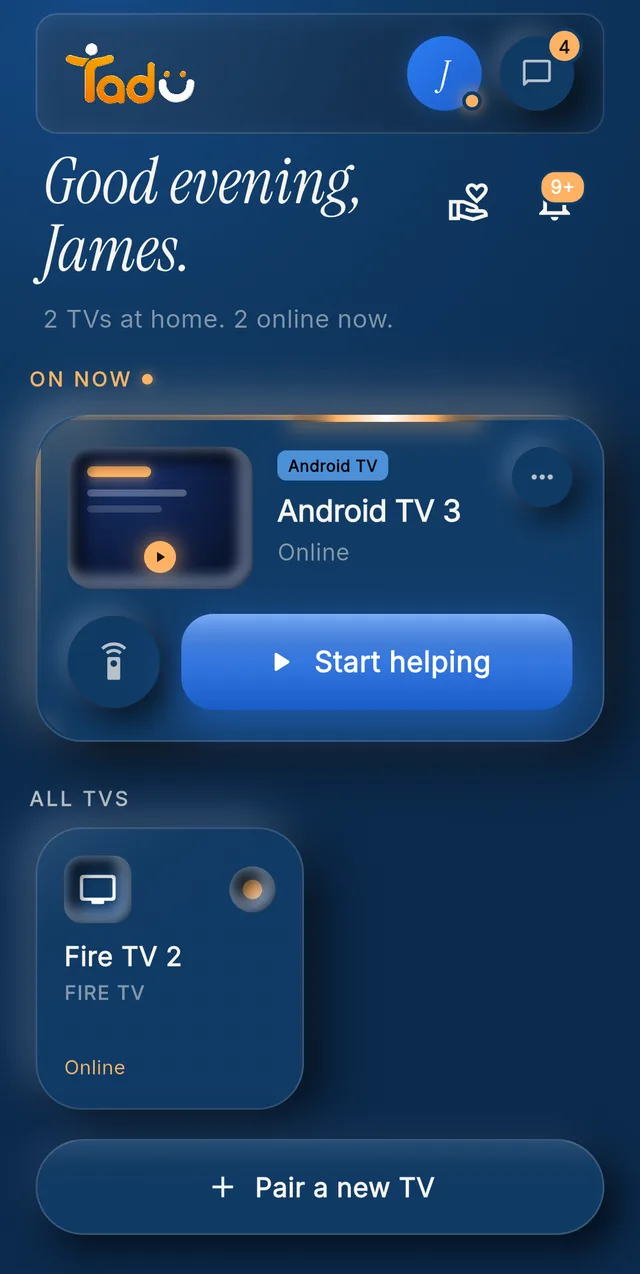
You didn’t stop being the family’s tech person when you moved abroad. You just lost the ability to walk into the room. Tadu gives that back: their TV screen, live on your phone, from wherever you are, with their Allow every time.
Free for 14 days · Fire TV, Google TV & Android TV

Three evenings
Their evening. Your afternoon. One connection.
Their evening
The app signed itself out
It is their evening and your working day. The streaming app has signed itself out again. You tap their TV, they press Allow, and you type the password from your desk while they watch it come back.
Any time zone
The menu nobody can describe
A frozen app, a lost setting, an update prompt in a language of menus nobody speaks. You see the screen they see, and you answer it for them, from one time zone to another.
Sunday
The Sunday call, upgraded
After the catch-up, you show them your camera live on their TV, or present the week's photos one at a time while you talk them through each one. Nothing is stored; the moment stays with you both.

Why nothing else worked
“Same Wi-Fi” is no help from another continent.
Almost every TV remote app, including the TV makers’ own, requires your phone and the TV to be on the same home network, and none of them show you the screen. Video-calling while a parent points their phone camera at the TV is the workaround every far-away family knows, and it fails exactly when the menus get confusing.
Tadu was built for the cross-network case first: no same-Wi-Fi requirement, no hardware hub to ship and install, no camera in their room. Just a free app on the TV they already own, and their Allow on every screen-sharing session.

Four steps
Set up once, help from anywhere.
- 01 / Step
Install the free TV app
From the Amazon Appstore on a Fire TV, or Google Play on a Google TV or Android TV.
- 02 / Step
Pair once with the code
The TV shows a 6-character code; type it into your phone. Someone at the TV reads it to you if you are not there.
- 03 / Step
They press Allow
Every screen-sharing session starts with Allow on their TV, with your name and photo on the card.
- 04 / Step
You fix it from anywhere
Their screen live on your phone, with a full remote, over any ordinary internet connection.
Google TV · Android TV
Get it from Google Play
Open the listing, choose Install and pick their TV, or search “Tadu Remote” in Google Play on the TV itself.
Fire TV
Get it from the Amazon Appstore
On the Fire TV, search the Amazon Appstore for “Tadu Remote” and install it. The TV app is free.
For the parent
A printable TV help card
One page to keep by the TV that explains Tadu to your parent, in 11 languages.
The whole circle
Whoever is awake answers.
Siblings in three countries can share one plan. When your parent presses Call for help on the TV, every helper’s phone rings like a call; the first to accept takes it and the others are told.





Questions
From families abroad.
My parents are in one country and I am in another. How do I help with their TV?
Install the free Tadu app on their Fire TV, Google TV or Android TV, pair once with the 6-character code, and from your phone anywhere else you can see their screen live and press the buttons for them. Every screen-sharing session needs their Allow on the TV and is encrypted. Distance and time zones change nothing about how it works.
Does international distance make it slow or unreliable?
Tadu runs over ordinary internet connections and behaves the same across a street or an ocean. Session quality follows the slower of the two connections, usually the TV's Wi-Fi, not the distance between you.
Can my siblings in different countries all help?
Yes. Add them as helpers: Tadu Plus covers you plus 2 helpers on 1 TV, Tadu Family you plus 5 helpers per TV, up to 3 TVs, and helpers never need their own plan. When your parent presses Call for help on the TV, every helper's phone rings like a call; whoever is awake in their time zone accepts, and the others are told.
Do my parents need to learn an app?
No. Everything they need is on the TV they already watch: the consent card, your messages, reminders and the Call for help button. Their only job is pressing OK on their own remote when your name appears, because Allow is already selected.
Also read how we protect your family and pricing.
Guides
For families far from home.
Be there, from anywhere.
Their evening, your afternoon, one connection.
Free for 14 days · Fire TV, Google TV and Android TV