

A safer way to help
Don’t give anyone standing access to your parents’ screens.
The instinctive fix, installing a general remote-desktop tool on a parent’s device, is the same mechanism scammers use against older adults. There is a consent-first way to do this.
Why this matters
Standing access is the scam surface.
Tech-support fraud is among the costliest categories of fraud reported by older adults to the FBI’s Internet Crime Complaint Center (IC3 annual reports). The documented playbook is simple: convince the victim to install remote-access software, then “troubleshoot” their device while emptying their accounts.
That is not a reason to leave your parents without help. It is a reason to choose a help model where no standing access exists at all: where every session begins with your parent’s own yes, on their own screen, and strangers can’t even ask.

Side by side
Session consent, or standing access.
- Who can connect
- Remote-desktop tools: Anyone with the ID and password, including a scammer on the phone
- Hardware hubs: The family, through the vendor's account
- Tadu Remote: Only helpers the account owner added can even request
- When access is possible
- Remote-desktop tools: Any time, once installed (standing access)
- Hardware hubs: Any time the family chooses to check in
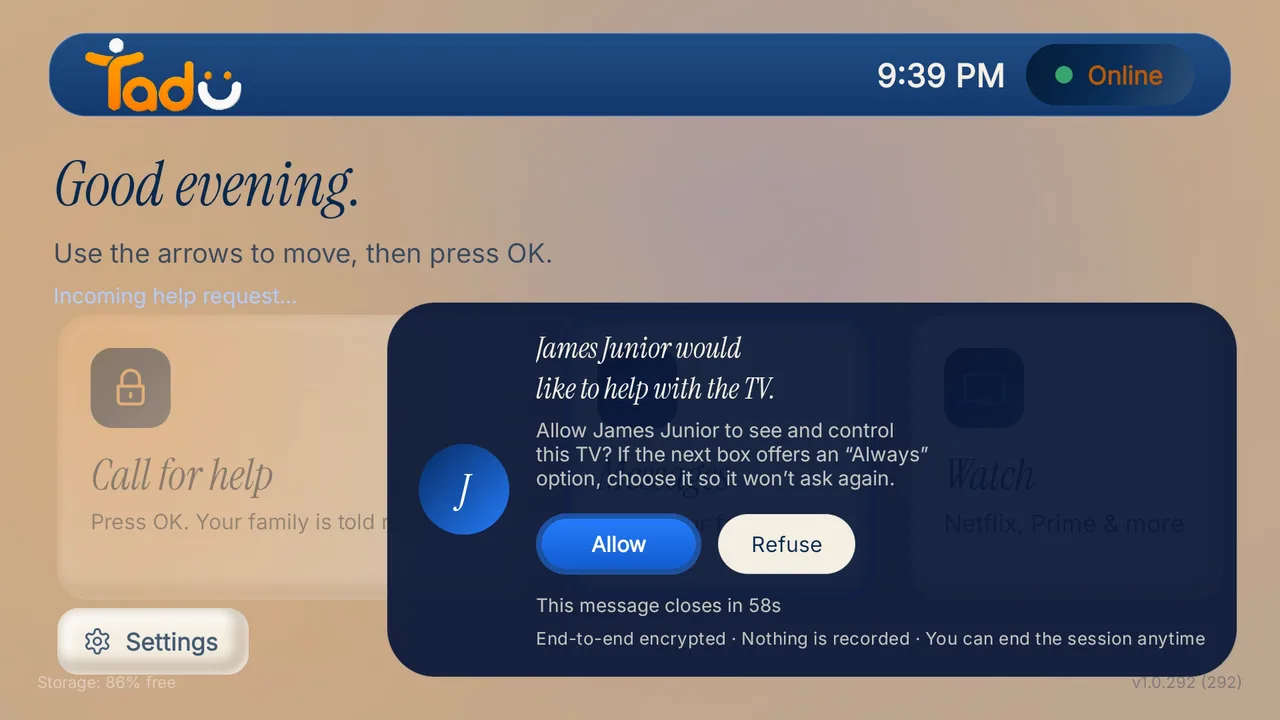
- Tadu Remote: Only during a session your parent just approved on the TV
- What the parent sees
- Remote-desktop tools: Often nothing; sessions can start silently
- Hardware hubs: Depends on the device; check-ins may not ask
- Tadu Remote: A consent card with your name and photo; "Connected" while live
- What gets stored
- Remote-desktop tools: Varies by tool and configuration; sessions can be recorded
- Hardware hubs: Varies; camera devices often record
- Tadu Remote: Nothing from a session: live streams are never recorded or stored
- Built for
- Remote-desktop tools: IT departments supporting computers
- Hardware hubs: Monitoring, with hardware to buy and install
- Tadu Remote: Families helping with the TV, the appliance parents actually use
| Feature | Remote-desktop tools | Hardware hubs | Tadu Remote |
|---|---|---|---|
| Who can connect | Anyone with the ID and password, including a scammer on the phone | The family, through the vendor's account | Only helpers the account owner added can even request |
| When access is possible | Any time, once installed (standing access) | Any time the family chooses to check in | Only during a session your parent just approved on the TV |
| What the parent sees | Often nothing; sessions can start silently | Depends on the device; check-ins may not ask | A consent card with your name and photo; "Connected" while live |
| What gets stored | Varies by tool and configuration; sessions can be recorded | Varies; camera devices often record | Nothing from a session: live streams are never recorded or stored |
| Built for | IT departments supporting computers | Monitoring, with hardware to buy and install | Families helping with the TV, the appliance parents actually use |
Remote-desktop tools are excellent at what they were built for: IT teams supporting computers. Helping an eighty-year-old with the television is a different job, with different stakes, and it deserves a tool designed around consent.
House rules
Three rules to share with your parents.
Short enough to say on the phone, and worth saying more than once.
- 01 / Rule
Never install anything for a caller
A genuine company does not phone out of the blue and ask your parent to install software so it can "fix" something.
- 02 / Rule
Never read out a code to a stranger
With Tadu there is no code to read out after the one-time pairing, and nobody the account owner did not add can even ask.
- 03 / Rule
Not sure? Press Refuse
If a name on the TV card is unfamiliar, Refuse ends it there. Doing nothing works too: no answer within 60 seconds means no session.
Print the TV help card to keep by the remote, in your parent’s language.
Questions
What families ask.
Is it safe to put a remote-desktop tool on my parent's device?
It carries real risk. General remote-desktop tools built for IT departments grant standing access: once installed, anyone with the credentials can connect. Tech-support fraud is among the costliest categories reported by older adults to the FBI's IC3, and a documented mechanism is convincing the victim to install exactly this kind of remote-access software.
How is Tadu Remote different from remote-desktop software?
Tadu grants no standing access. Every screen-sharing session must be approved by your parent on their TV, on a card showing who is asking, and only people the account owner added as helpers can even ask. Sessions are encrypted, never recorded, and end the moment either side stops them. A scammer on the phone cannot talk a parent into granting access to a stranger, because strangers cannot request it.
What about hardware hubs or camera devices made for seniors' TVs?
Hardware hubs solve remote control by adding a box, and often a room camera with 'check in anytime' viewing. That is a monitoring model: convenient, but it removes the parent's moment of consent and puts a camera in their living room. Tadu is software-only on the TV they already own, has no camera, and keeps the parent as the decision-maker for every session.
What should a family use for TV help specifically?
A tool built for the TV and for consent: it should show you the actual TV screen, work across networks without a same-Wi-Fi requirement, require the parent's Allow on the TV each time, and store nothing from the session. That is what Tadu Remote's Assist does on Fire TV, Google TV and Android TV.
Background
Read on.

Help with their yes, every time.
No standing access. No camera. Nothing recorded.
Free for 14 days · Fire TV, Google TV and Android TV