How-to
How to fix your parent’s Fire TV remotely, without being there
 By Dsign Digital Technologies, makers of Tadu RemoteUpdated October 2026
A practical playbook for the recurring TV failures long-distance families deal with, and the consent-first way to fix them remotely.
The short answer
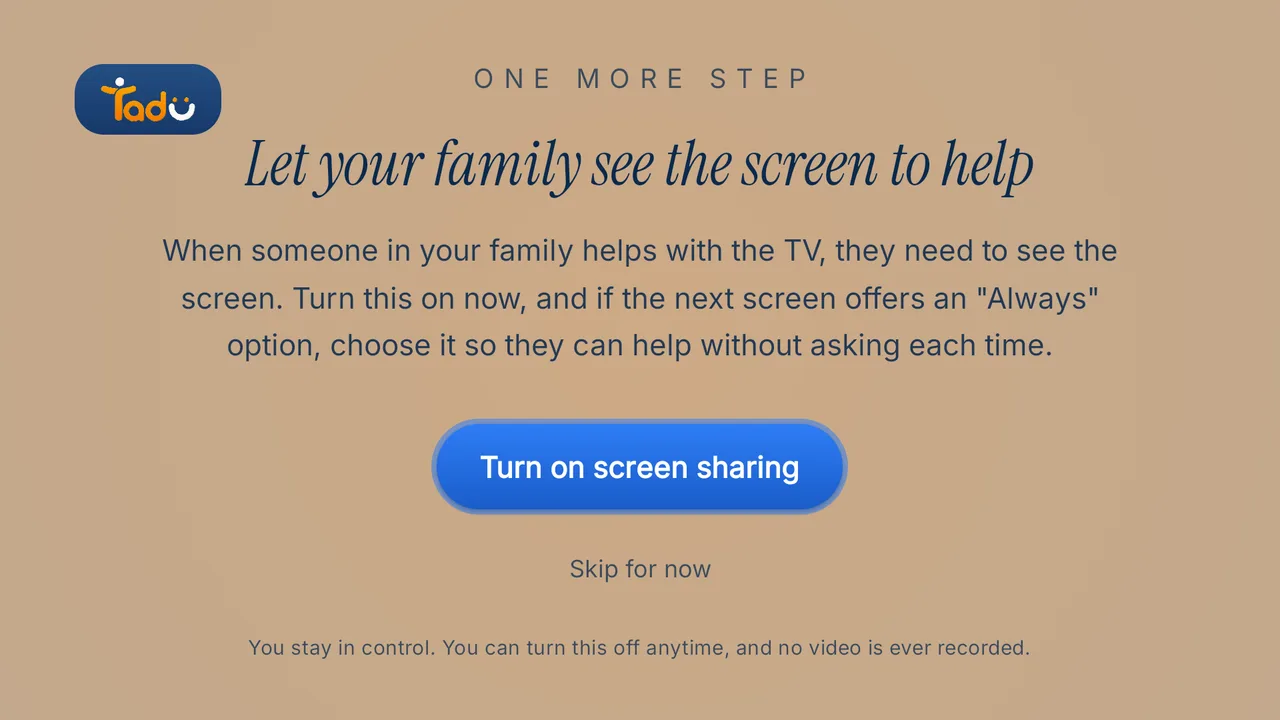
You can fix almost every routine Fire TV problem (signed-out apps, frozen apps, changed settings) from your phone, from anywhere, if you can see the screen and press the buttons remotely. That takes a screen-sharing app on the TV itself, not a same-Wi-Fi remote app, with the parent pressing Allow on the TV for each session. Tadu Remote’s Assist is built for exactly this. Set up the Fire TV first: the Fire TV setup guide.
Most “the TV is broken” calls are one of five small failures. None of them needs a technician; all of them need eyes on the screen and a working thumb, which is precisely what you can’t provide over a phone call. Here is the playbook.
What are the five failures, and how do you fix each?
- 01 / Failure
The wrong input
A press of the source button and the screen goes black or shows "No signal". Seeing the Fire TV screen tells you quickly whether this is the cause: if your view looks normal while theirs is black, it's the input. Talk them through Input or Source on the TV remote. - 02 / Failure
A streaming app signed itself out
Password prompts are where phone guidance goes to die: tiny on-screen keyboards, case sensitivity, a parent reading characters aloud. Remotely, you type the password yourself from the keyboard on your phone while they watch. Dignity intact. - 03 / Failure
A frozen or misbehaving app
The cure is what you'd do on the sofa: close the app, reopen it; if needed, restart the device. Doing it remotely just requires the ability to see the screen and press the buttons, which is exactly what a consent-gated Assist session gives you. - 04 / Failure
Settings drift
Subtitles in the wrong language, audio switched to a mode the soundbar hates, text suddenly tiny. Settings menus are the hardest thing to narrate over a call and the easiest thing to fix when you can see them. - 05 / Failure
The update prompt
A full-screen dialog asking something your parent doesn't feel safe answering. They stop using the TV rather than press the wrong thing. Remotely, you read it, answer it, and explain what it was, turning a scary moment into a non-event.
 Back to their show
What setup makes all five fixable?
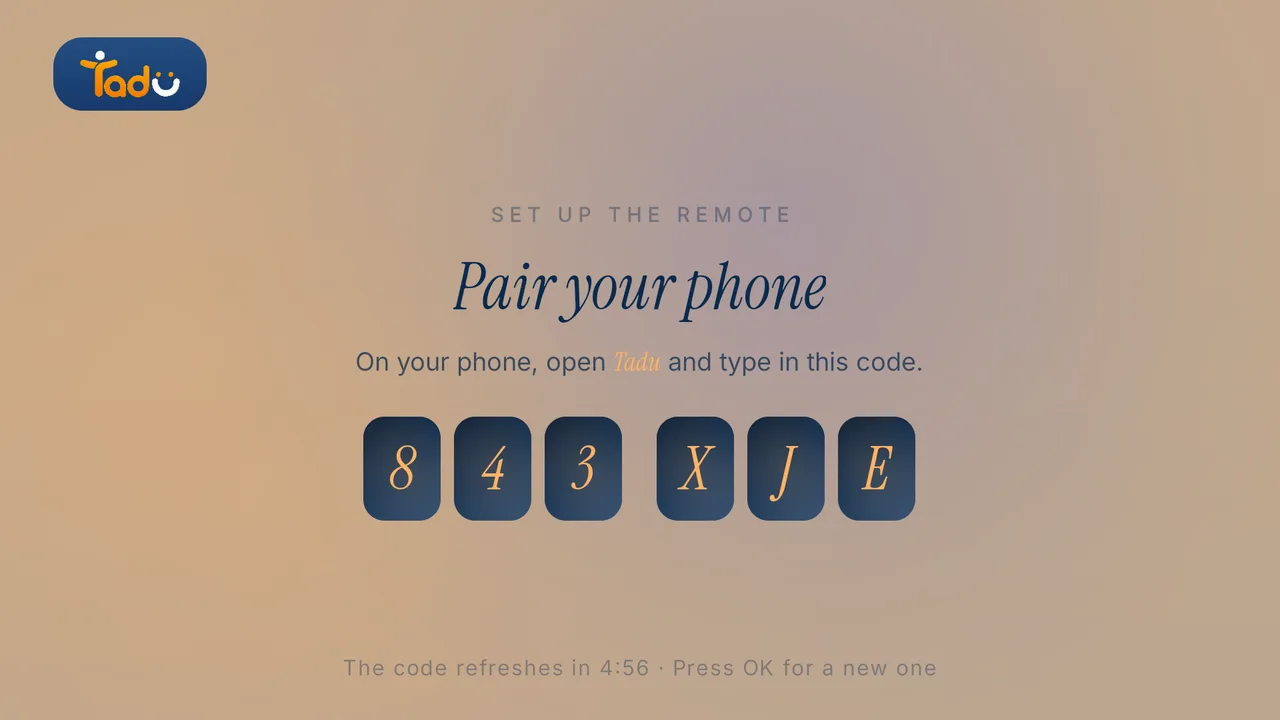
One-time, while you are visiting (or by talking a neighbour through it): install the free Tadu app on the Fire TV, pair it with your phone using the 6-character code, link the remote with Amazon’s 4-digit code, and turn on screen sharing. From then on, whenever a call comes:
- Tap their TV in your app, from any network, wherever you are.
- Their TV shows your name and photo; they press OK on their own remote (Allow is already selected).
- Their screen appears live on your phone, encrypted, never recorded.
- You fix it (input, password, restart, settings) while they watch it come back.
One honest note: apps with copy protection, which includes most streaming services, show black in the live view while they play. Your controls still work, and the picture returns as soon as the TV leaves the protected app, so sign-ins, menus and inputs are all fixable. The consent step is not friction; it is the feature. Your parent stays the decision-maker for their own living room, every single time, and nothing about the session is stored anywhere.
Can anything be prevented?
- Tape over or remove the second remote if the TV has one; most input jumps come from it.
- Keep the TV’s apps signed in with a password-manager entry you control, so re-authentication is a copy-paste for you, not an ordeal for them.
- Add siblings as helpers so the fix doesn’t always wait for your time zone. Whoever is awake takes the session.
Set up their TV
A free app on the TV they already own.
Install Tadu on their Google TV, Android TV or Fire TV, then pair it with your phone using the 6-character code it shows. It takes a few minutes, once.
Google TV · Android TV
Get it from Google Play
Open the listing, choose Install and pick their TV, or search “Tadu Remote” in Google Play on the TV itself.
Fire TV
Get it from the Amazon Appstore
On the Fire TV, search the Amazon Appstore for “Tadu Remote” and install it. The TV app is free.
For the parent
A printable TV help card
One page to keep by the TV that explains Tadu to your parent, in 11 languages.
Can I fix my parent's streaming apps remotely?
Yes. With screen-sharing TV assistance you see their actual TV screen on your phone and control it: relaunch the app, re-enter the password, clear the error dialog. Apps with copy protection show black in the live view while they play, but your controls still work. With Tadu Remote this works over the internet on Fire TV, Google TV and Android TV, with your parent's Allow on the TV each session.
The TV is on the wrong input and my parent can't get back. What do I do?
Wrong input is one of the most common "broken TV" calls. Tadu shows you what the Fire TV is showing, not which input the TV is on, so if your view looks normal while your parent sees "No signal", the TV has left the Fire TV input. Ask them to press Input or Source on the TV remote and choose the Fire TV's HDMI. On many TVs, pressing Home on the Fire TV remote also switches back by itself.
Do I need my parent to read out codes or navigate menus?
No. That is the failure mode this category exists to remove. After the one-time pairing, their only job is pressing OK on their own remote when your name appears on the TV. You do the menus.

Keep reading
Related guides
Setup
Set up Tadu Remote on a Fire TV
Install the free TV app, type the 6-character code into your phone, link the remote with Amazon’s 4-digit code and turn on screen sharing. Every screen your parent will see.
Read the guide →October 2026

How-to
How to control your parents’ TV from another country
Why almost every remote app fails the moment you leave their Wi-Fi, what the workarounds involve, and how cross-network, consent-first TV help works.
Read the guide →October 2026
Setup
Set up Tadu Remote on a Google TV or Android TV
Install the free TV app from Google Play, type the 6-character code into your phone, turn on Tadu Remote Control in Accessibility and allow messages over other apps.
Read the guide →October 2026