
How-to
Medication reminders, on the screen they actually watch
 By Dsign Digital Technologies, makers of Tadu RemoteUpdated October 2026
Set from your phone, shown on their TV at the right hour, confirmed with one press of OK. And the honest limits, stated plainly.
The short answer
You can put medication and appointment reminders on an elderly parent’s TV from your phone, from anywhere: a note, a photo, or both, shown at the time you set in the TV’s own time zone, once or daily. They press OK to confirm; Back shows it again in 5 minutes; you are told when they pressed OK. It supports a routine. It is not a medical device, and it should never be the only thing standing between a person and their medicine.
Why do reminders fail at a distance?
Every long-distance family invents the same systems. The morning call that doubles as a medicine check, until a meeting moves and the call doesn’t happen. The phone alarm you set on a visit, silenced within a week, because an alarm that interrupts is an alarm that gets turned off. The weekly pillbox, which organises the doses beautifully and reminds no one of anything, from its drawer.
The common failure isn’t forgetfulness, it’s placement: the prompts live where the family put them, not where the parent’s attention is. For several hours of every day, that attention is on one screen: the television.
What does a TV reminder do differently?
A reminder on the TV appears in the middle of the serial, the news, the match, at the hour it matters. And because a family member wrote it, it carries the one thing no dispenser has: a familiar voice on the page. “Ma, the blood-pressure tablet. The white one, after lunch.” A photo of the right packet. Reminding stops being an appliance beeping and goes back to being the family speaking.
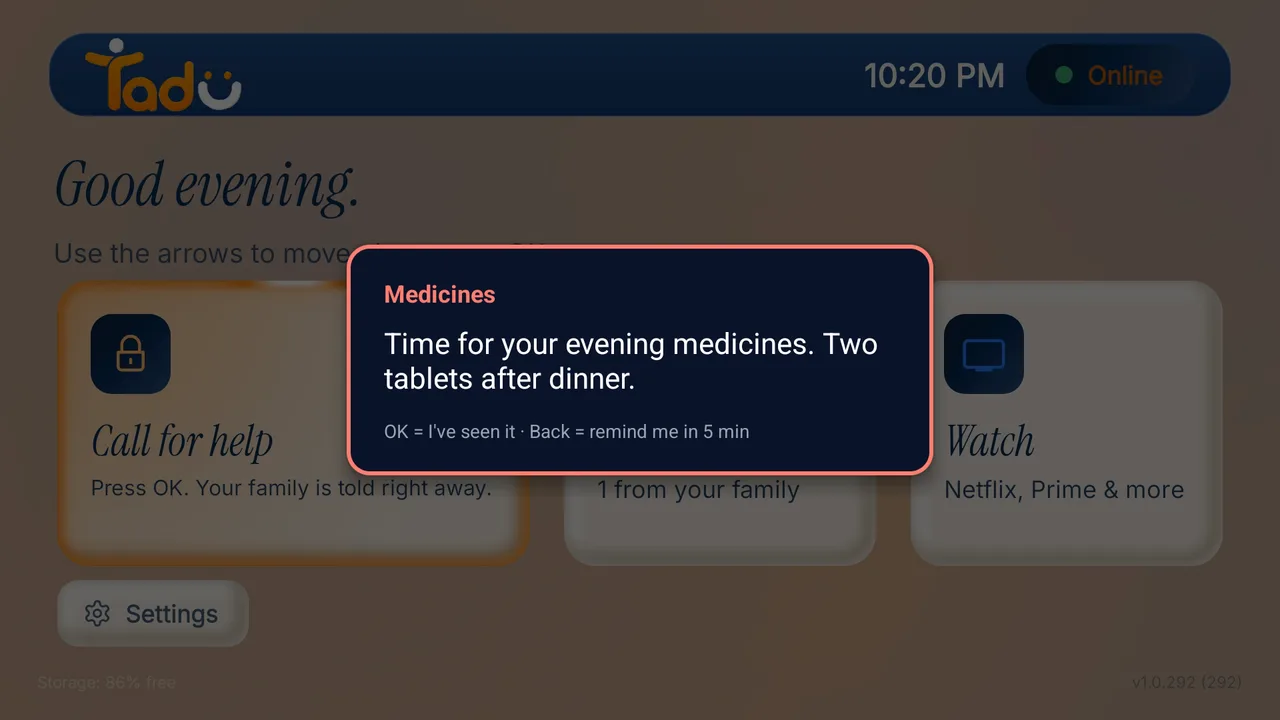
The parent’s side stays one-press simple: OK means “I have seen it”; Back means “remind me in 5 minutes”, on the remote they already hold. No app, no login, no new device on the shelf. They can also pause or remove a reminder from the TV, and you are told.

How does the loop close both ways?
The difference between a reminder and a hope is knowing it landed. A “must confirm” reminder stays on the TV until they press OK, and your phone then shows “Reminder acknowledged”. If the TV was off at the hour, your phone shows “Reminder missed”, and you make the phone call, now with something concrete to ask. For daily medicines, set it once and it keeps its own schedule, in the TV’s time zone, not yours.
How does it work with Tadu Remote?
- 01 / Step
Create the reminder on your phone
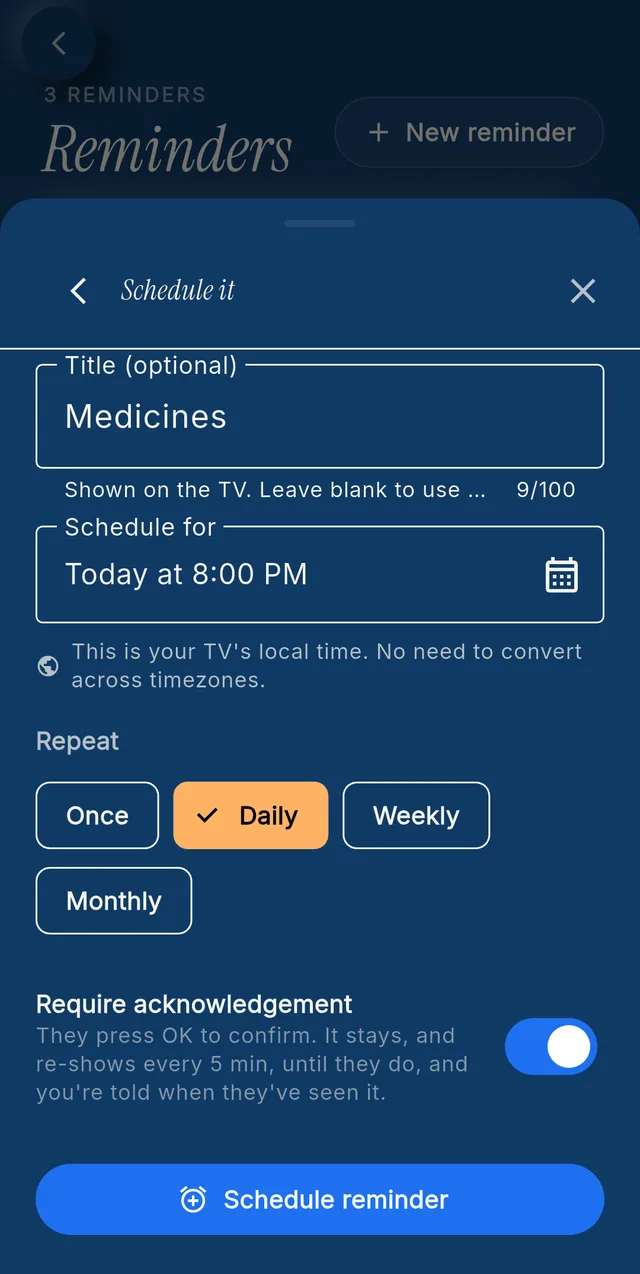
In the Tadu app, open the TV, choose Set reminder, and write the note, or make it visual: attach a photo of the right packet, with a note if you like. - 02 / Step
Set the time and repetition
Choose when it appears on their TV: a one-off for Thursday's appointment, or daily for the evening medicine. Times follow the TV's clock, not yours. Switch on "must confirm" so it stays until they press OK. - 03 / Step
It appears on their TV
At the set hour the reminder appears over what they are watching. OK means "I have seen it"; Back means "remind me in 5 minutes". It never wakes a TV that is off. - 04 / Step
Check it landed, from anywhere
Your phone shows "Reminder acknowledged" when they pressed OK, or "Reminder missed" if the TV was off. Your parent can pause or remove a reminder on the TV, and you are told.
A privacy note, stated plainly: a photo you attach to a reminder is stored encrypted so the TV can show it at its hour. This is the one deliberate exception to Tadu’s rule that live sessions are never recorded or stored. It is used for nothing else and deleted when you delete the reminder or your account. The account owner sets reminders.
What are the honest limits?
Anyone selling reminders to families owes them the fine print in large type, so here is ours. A TV reminder needs the TV to be on and connected to appear; a power cut, a Wi-Fi outage or a switched-off TV means it is missed, and your phone tells you so. And a reminder system (ours or anyone’s) is a family convenience, not a medication-management or medical device: for genuine clinical adherence needs, it belongs alongside a doctor’s or pharmacist’s plan, never in place of one.
Set up their TV
A free app on the TV they already own.
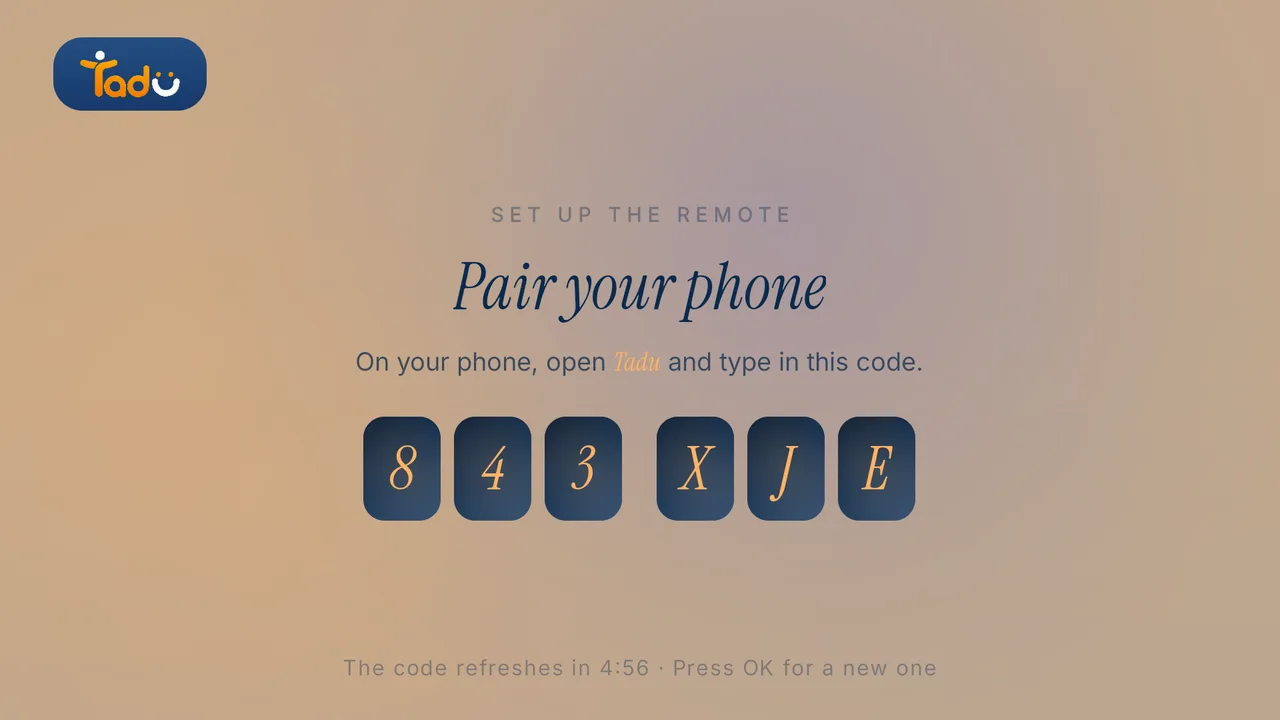
Install Tadu on their Google TV, Android TV or Fire TV, then pair it with your phone using the 6-character code it shows. It takes a few minutes, once.
Google TV · Android TV
Get it from Google Play
Open the listing, choose Install and pick their TV, or search “Tadu Remote” in Google Play on the TV itself.
Fire TV
Get it from the Amazon Appstore
On the Fire TV, search the Amazon Appstore for “Tadu Remote” and install it. The TV app is free.
For the parent
A printable TV help card
One page to keep by the TV that explains Tadu to your parent, in 11 languages.
Can I set medication reminders on my elderly parent's TV from my phone?
Yes. With Tadu Remote on their Fire TV, Google TV or Android TV, you create the reminder on your phone (a note, a photo, or a photo with a note) and it appears on their TV at the time you set, in the TV's own time zone, once, daily, weekly or monthly. Your parent presses OK to confirm, Back means remind me in 5 minutes, and you are told when they pressed OK.
Why put reminders on the TV instead of a phone or a pill dispenser?
Because the TV is where their attention already is. Phone alarms get silenced, missed in another room, or dismissed by reflex; dispensers help with dosing but cannot get attention across the house. A reminder on the screen a parent is actually watching, written by a family member, meets them where they are. No new device, no new habit to learn.
How do I know whether my parent saw the reminder?
For a "must confirm" reminder, the card stays on the TV until they press OK, and your phone shows "Reminder acknowledged" when they do. If the TV was off at the time, your phone shows "Reminder missed", so you know to call.
Is a TV reminder system a medication management or medical device?
No, and any product claiming otherwise deserves scepticism. A TV reminder is a family convenience that supports a routine: it needs the TV to be on and connected, and it must not be the sole means of prompting medication or any health-critical action. For clinical adherence needs, involve a doctor or pharmacist and purpose-built medical tools.

Keep reading
Related guides

How-to
How to send messages and photos to a parent’s TV, from anywhere
When the phone goes unanswered, the TV is where they are. Short messages on the TV, photos presented live on the biggest screen in the house, and reminders at the hour that matters.
Read the guide →October 2026

Explainer
Long-distance caregiving, without cameras in their home
Most families need reachability, not observation. What consent-first, camera-free care looks like in practice, and when a monitoring product is the right, separate choice.
Read the guide →October 2026
Setup
Set up Tadu Remote on a Fire TV
Install the free TV app, type the 6-character code into your phone, link the remote with Amazon’s 4-digit code and turn on screen sharing. Every screen your parent will see.
Read the guide →October 2026