
How-to
How to send messages and photos to a parent’s TV, from anywhere
 By Dsign Digital Technologies, makers of Tadu RemoteUpdated October 2026
The screen they are already watching is the one place a message cannot be missed. How TV messages, live photo presentations and Live Cast work across any distance.
The short answer
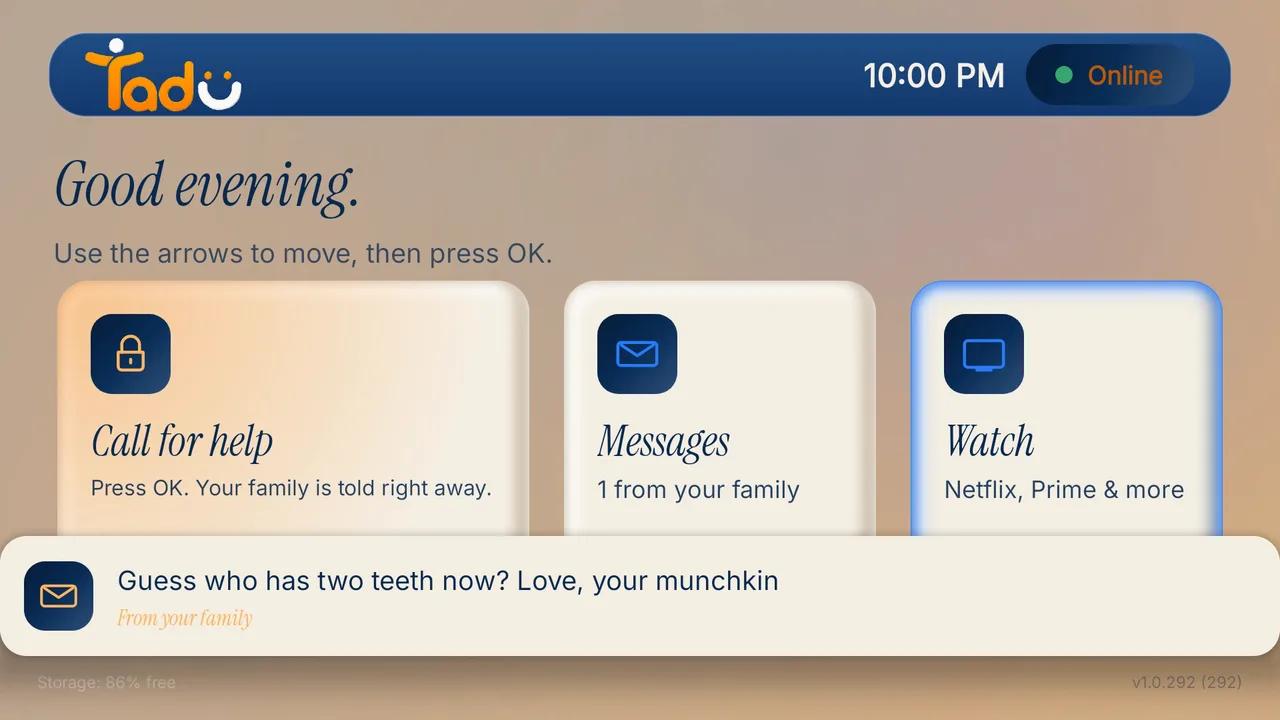
The reliable way to reach a parent who doesn’t hear the phone is the screen they are already watching. With Tadu Remote on their Fire TV, Google TV or Android TV, a short message from your phone appears on their TV from any distance, photos are presented live on the biggest screen in the house while you talk, and Live Cast shows your camera in their living room. No same-Wi-Fi requirement, nothing for the parent to install or learn.
What is the unanswered phone problem?
Every far-away family knows the spiral: you call, no answer. You call again. You text, knowing the phone is face-down in the kitchen while the TV plays at full volume in the living room. Nothing is wrong, but you can’t know that, and the one screen guaranteed to have their attention is the one you can’t reach.
Meanwhile the things worth sharing go the other way badly, too: the grandchild’s play arrives as a thumbnail on a phone held at arm’s length, squinted at, handed around. The biggest, best screen in their house sits out of the family loop entirely.
Why don’t casting apps solve it?
The obvious tools (casting, screen mirroring, photo-frame apps) are built for people in the same room: they discover the TV over the local network, so they cannot see a TV in another city. Email-to-frame gadgets add a new device and a new account to manage. What the situation actually calls for is a cross-network channel to the TV itself, with the parent’s consent built in.
How do messages on the TV work?
With Tadu Remote on their TV, a short text note typed on your phone, up to 80 characters (160 for an urgent one), appears as a banner over whatever they are watching and waits in the TV’s Messages inbox: “Take my call.” “Open the door.” “I’m downstairs.” Your phone shows Sending, Delivered and Seen on TV. If the TV is off, the message waits and arrives when it is back. An urgent message wakes the screen, chimes, and stays until they press OK. On Fire TV, messages arrive as Fire TV notifications. Messages are text only, kept up to 7 days, then deleted.
How do photos reach the biggest screen in the house?
There is no “send a photo” message. Photos reach the TV live: start a photo presentation from your phone, your parent presses OK on the TV, and you show the photos one at a time while you stay on the call, narrating and zooming into the faces that matter. Nothing is uploaded to a cloud album and nothing is stored; when you stop, the photos are gone from the TV. The other route is a reminder with a photo, which appears at the time you set and is stored encrypted until you delete the reminder.

How do live moments work?
For the school play, the sunset, the first steps: Live Cast shows your phone camera, with your voice, on their TV in real time. It begins with their OK on the TV, like every session, and the stream is encrypted and never recorded or stored: when the moment ends, it lives only in memory, exactly like being there. On Google TV it can sit in a corner or on one half so their programme continues; on Fire TV it is full screen. Live Cast and photo presentations use plan minutes over the internet and are free on their home Wi-Fi.
And for the message that must arrive at 2pm?
Some messages belong to a time, not a moment: the afternoon medicine, tomorrow’s appointment. Those are reminders: a note, a photo, or both, set from your phone to appear on their TV at the hour you choose in the TV’s own time zone, once or every day. OK means they have seen it; Back means remind me in 5 minutes; you are told when they pressed OK. Because a reminder must survive until its moment, its photo is the one thing stored, encrypted, and deleted when you delete the reminder. The medication-reminders guide covers this in depth.
Set up their TV
A free app on the TV they already own.
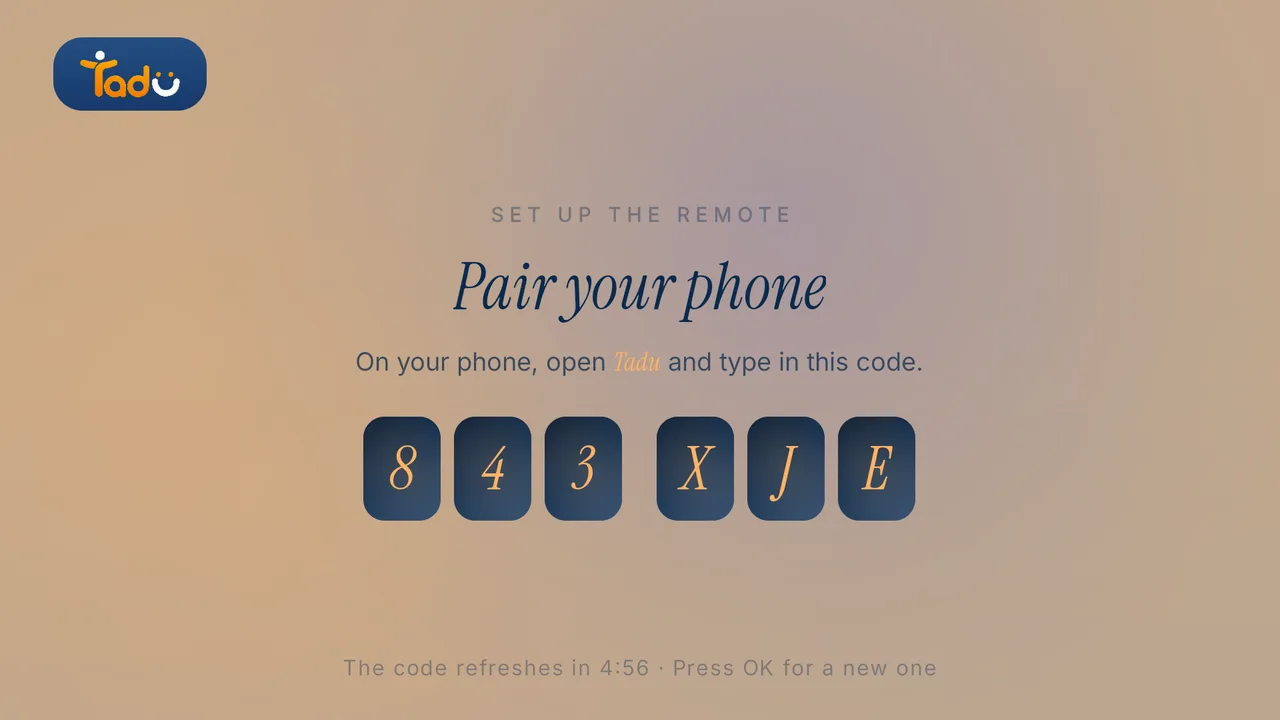
Install Tadu on their Google TV, Android TV or Fire TV, then pair it with your phone using the 6-character code it shows. It takes a few minutes, once.
Google TV · Android TV
Get it from Google Play
Open the listing, choose Install and pick their TV, or search “Tadu Remote” in Google Play on the TV itself.
Fire TV
Get it from the Amazon Appstore
On the Fire TV, search the Amazon Appstore for “Tadu Remote” and install it. The TV app is free.
For the parent
A printable TV help card
One page to keep by the TV that explains Tadu to your parent, in 11 languages.
Can I send a message to my parent's TV screen remotely?
Yes. With Tadu Remote on their Fire TV, Google TV or Android TV, a short text note you type on your phone (up to 80 characters, 160 for an urgent one) appears as a banner on the screen they are actually watching and waits in the TV's Messages inbox, from any city or country. Your phone shows Sending, Delivered and Seen on TV. Nothing is needed on the parent's side beyond the TV itself.
How do I show photos on my parents' TV when I live far away?
Ordinary casting needs your phone on the same Wi-Fi as the TV, so it fails from far away. With Tadu you present photos live over the internet: your parent presses OK on the TV, then you show the photos one at a time from your phone while you talk them through each one, zooming in to point at a face. The photos are shown live and never stored on our servers; there is no cloud album and no account for the parent to manage.
What if I want them to see something live, as it happens?
Live Cast shows your phone camera, with your voice, on their TV in real time: the school play, the sunset, the new flat. It is an encrypted live stream that is never recorded or stored. It starts, like every session, with their OK on the TV, and there is nothing to install or operate on their side. Not available in the UAE.
Can a message arrive at a set time instead of right now?
Yes, that is a reminder. Set a note, a photo, or a photo with a note to appear on their TV at the time you choose, in the TV's own time zone, once or on a repeating schedule. OK means they have seen it, Back means remind me in 5 minutes, and you are told when they pressed OK. The reminder photo is the one stored media, kept encrypted until you delete it. Messages are kept up to 7 days, then deleted; live casts and live photo presentations are never recorded.

Keep reading
Related guides

How-to
Medication reminders, on the screen they actually watch
Phone alarms get silenced; pillboxes stay in drawers. How family-set reminders on a parent’s TV work (text or photo, OK to confirm, Back to see it again) and their honest limits.
Read the guide →October 2026
How-to
An NRI’s guide to helping your parents in India with their TV
For families abroad with parents in India: why the usual apps fail across borders, what to set up on your next visit or one guided call, and how consent-first help works from abroad.
Read the guide →October 2026
Setup
Set up Tadu Remote on a Fire TV
Install the free TV app, type the 6-character code into your phone, link the remote with Amazon’s 4-digit code and turn on screen sharing. Every screen your parent will see.
Read the guide →October 2026